Shroom and Gloom Controls
WASD through tunnels, click the hand, and check in-game options because bindings may still change.
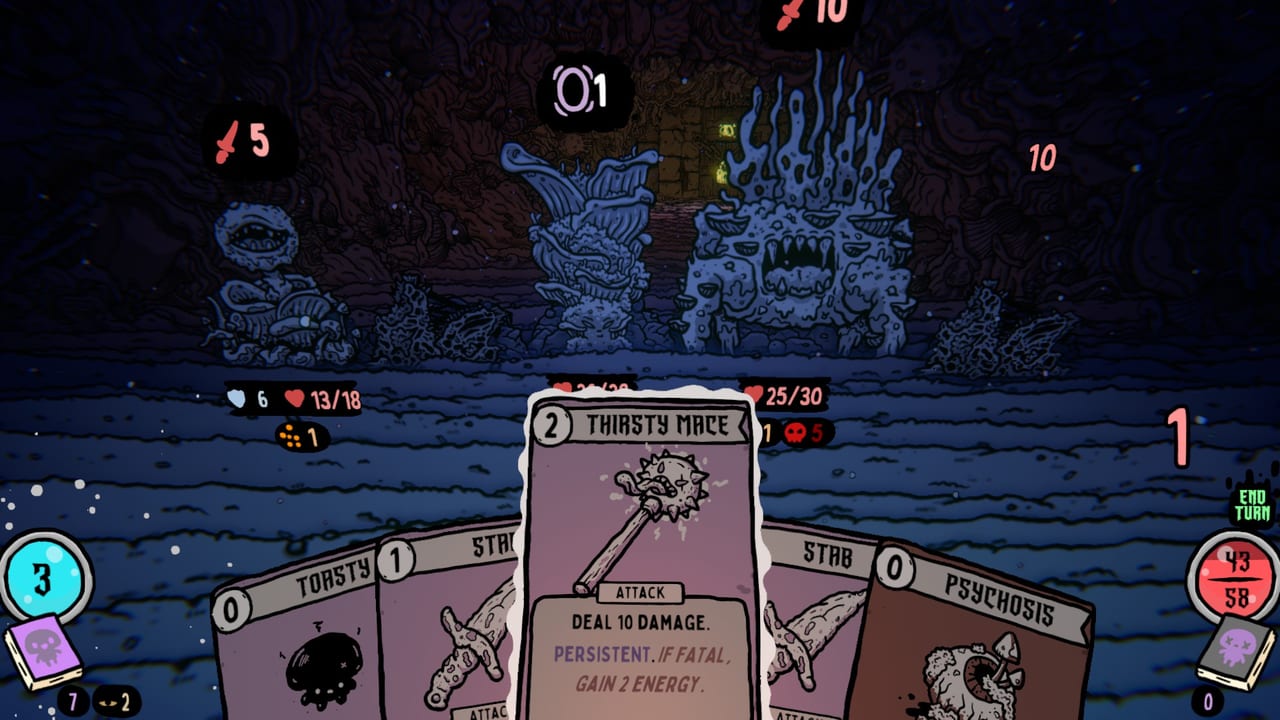
Shroom and Gloom is a first-person card game, which is a polite way to say your hands are doing two jobs. You walk tunnels like a dungeon crawler. You click cards like a deckbuilder. Team Lazerbeam built that hybrid on purpose. It is not a bug that you have to look at a mushroom and also look at a roast. It is also not a moral failing if that hybrid feels awkward on a laptop trackpad or a first-time controller.
This page is honest about input. Bindings live in the in-game options and may change before Early Access on 10 September 2026. Older demo builds have been called unwieldy. Community threads complain about mouse travel, a small end-turn control on the far side of the screen, and trackpad strain. Read the options. Do not assume a streamer’s layout is yours. If you still need the game loop, How to Play is the rules. If you still need to install, the demo hub and system requirements are the door.
First-person plus cards
You are not a cursor hovering over a tableau. You are a body in a hand-drawn 3D tunnel holding a hand of cards. Movement uses standard first-person keys. Looking around is how you target a lock, a dig spot, a dummy, a frog statue, or a mushroom with spell weakness already lodged in it. The card hand occupies the bottom of the view. Playing a card is interacting with whatever you are aimed at.
That split is why the game feels like neither Slay the Spire nor a shooter. Energy still gates the hand. Headpoints still drop when you greed. The camera still asks you to find the end-turn control after you stare at a boss. If you fight the camera, you will misclick a roast. If you ignore the camera, you will miss a Foresight chest on a side path. Practice in the first rooms from Getting Started before you blame the biome.
Everything that can be a card should be a card, including rest, keys, and Fireballs you feed for Burning Sensation. Input has to support that joke. You will aim at a campfire and also click a warmth card. You will aim at a lock and decide whether to spend a key or headbutt for Headpoints. The Explore Deck Guide is the verb list. This page is how the mouse gets there.
Mouse and keyboard
Mouse and keyboard is the layout this wiki recommends for the demo. WASD moves. The mouse looks. Clicks play cards and confirm targets. Hover reads a card. Scroll or move may be required to see the far edge of a crowded hand, especially once moods such as rage and impatience join Toasty in the same row.
End turn is easy to miss. Players have pointed at a small control on the far right that forces extra mouse travel compared with a classic deckbuilder. That travel is the strain. Lower look sensitivity if you overshoot mushrooms. Raise it if you feel like you are dragging a sled. Sit with a real mouse if you can. A laptop trackpad makes the look-plus-click loop worse; at least one Steam thread described it as agonizing and a carpal-tunnel flare. That is useful feedback, not a challenge to beat.
Keyboard users should open options immediately and find the bindings for rest, map, and end turn if they exist in your build. Do not memorize a table from a YouTube overlay. Builds have mutated, and Early Access is still upcoming. If a key does nothing, it is unbound or the card in hand is the verb. Maps are cards. Rest is a card. The shovel is a card. Click them.
Combat targeting is aim, then play. Distant Shadow costs 3 energy and wants a body to lodge in; if you play it at the floor, that is an input miss, not a strategy. Roast wants fatal. If you clicked the wrong mushroom, you cooked a snack for nobody. The Combat Deck Guide will not fix your sensitivity. It will tell you which card should have been aimed.
Controller and Steam Input
Controller support has been a community topic rather than a fully documented console pitch. Shroom and Gloom is a Steam Windows and macOS game. There is no announced console version. If you plug in a gamepad, expect to need Steam Input, a community layout, or a lot of patience.
The hard parts are look, cursor-on-cards, and end turn. Analog look plus a virtual pointer is how most first-person UI hybrids work; it is also how people overshoot a tiny button. Older builds felt unwieldy here. That may improve. It may not be perfect on day one of Early Access. Check the in-game options first, then Steam’s controller overlay, then a community layout. Do not assume the game already mapped every face button to a card slot.
If a streamer says the demo is fine on a pad, believe their hands, not your unconfigured stick. If another player says it is painful, believe that too. Your job is to find a layout that lets you rest, roast, and not throw a Headbutt at the Gloom door. The Demo Walkthrough will not pause while you open Steam Input.
Options, rebinds, and comfort
Open options before the first lock. Look for mouse sensitivity, invert look, fullscreen, and any accessibility toggles your build actually contains. Unity games vary. This wiki will not invent a setting that is not on your screen. If a rebind list is present, bind end turn to something you can hit without crossing the whole view. Bind a leftover key to menu so you are not wiggling the camera to find it.
Comfort is part of play. The demo can eat an evening. First-person plus cards is more wrist work than a static tableau. Take breaks. Lower sensitivity instead of muscling through. If the art is the reason you are here—and it should be—you still need to click the dummy.
When a patch lands, re-check bindings. Team Lazerbeam has been iterating in public with demo updates. Demo notes and news are where those changes show up in prose. Early Access plans are the date. None of those pages replace the options menu.
Play Paperboy with the input you can actually finish a tunnel on. A clean mouse run that banks Toasty is worth more than a controller cosplay that misaims Distant Shadow. The mushrooms do not grade your hardware. They only grade whether the roast was fatal. Once the hand feels quiet, go back to How to Eat Enemies and How to Beat Bosses and spend the energy on the cards instead of on the cursor.
Frequently Asked Questions
Quick answers to the most common Shroom and Gloom questions.
What are the default Shroom and Gloom controls?
First-person move and look plus clicks on the card hand. Exact keys live in the in-game options and may change. See Getting Started for the first rooms those inputs are used in.
Is mouse and keyboard required?
It is the layout this wiki recommends. Trackpads add strain. Controller can work with Steam Input, but older builds have been called unwieldy.
Why is end turn hard to hit?
Some builds place a small end-turn control far from the hand, which adds mouse travel. Rebind it in options if your build allows, or lower look sensitivity so you stop overshooting.
Does the game have a console version?
No console version has been announced. Steam Windows and macOS are the platforms. Specs are on system requirements.
Will bindings stay the same in Early Access?
Maybe not. Early Access is scheduled for 10 September 2026, and the demo has already mutated. Recheck options after patches listed on demo notes.